Public documentation for carrier and A2P 10DLC review. No login required.
This page documents the actual in-app SMS opt-in flow used by
Borrowly, a mobile app for tracking items and money you lend.
Borrowly obtains affirmative consent before any SMS is sent.
Consent is not assumed at account creation alone — the user must review the
disclosure and tap Send verification code on the Phone setup
screen.
SMS program summary
Purpose: account verification and loan-related notifications
and reminders.
Message frequency: varies.
Message and data rates may apply.
Opt out: reply STOP.
Help: reply HELP.
Consent timing: obtained on the Phone setup screen
before the first verification SMS is sent.
Borrowly does not sell or share mobile numbers with third
parties for marketing or promotional purposes.
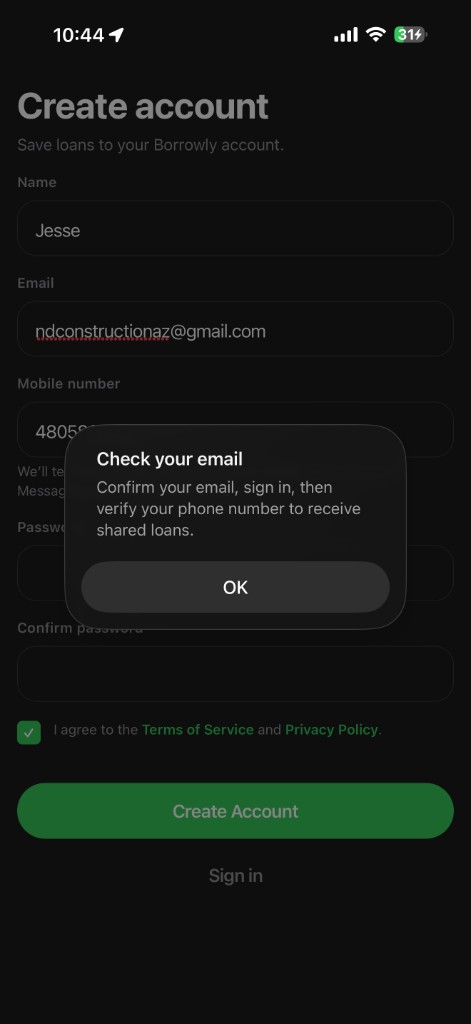
Create account. The user creates a Borrowly account with
their name, email, mobile number, and password, and accepts the
Terms of Service and
Privacy Policy.
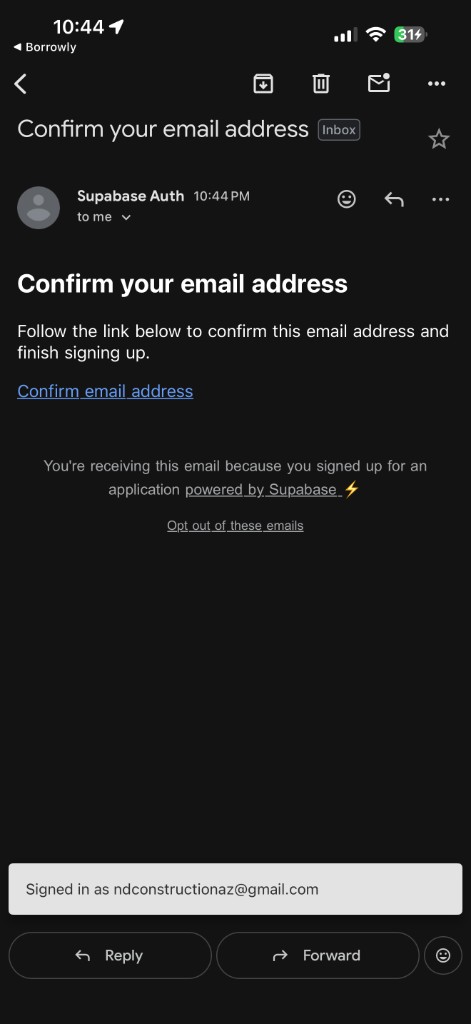
Confirm email. The user confirms their email address before
signing in.
Sign in. After email confirmation, the user signs in to
Borrowly.
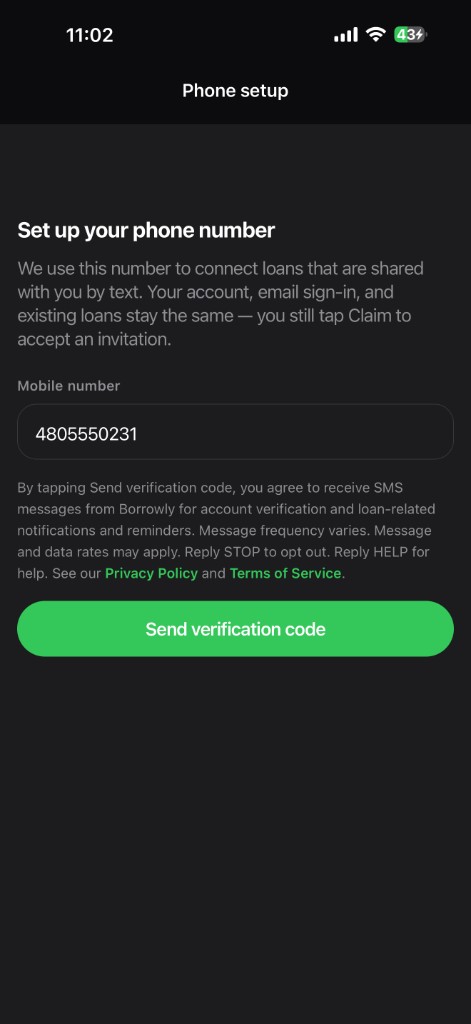
Phone setup screen. Borrowly displays the
Phone setup screen (Set up your phone number).
Enter mobile number. The user enters or confirms their mobile
number.
Review SMS disclosure (before sending). Before tapping
Send verification code, the screen displays this disclosure:
By tapping Send verification code, you agree to receive SMS messages from
Borrowly for account verification and loan-related notifications and
reminders. Message frequency varies. Message and data rates may apply. Reply
STOP to opt out. Reply HELP for help. See our
Privacy Policy and
Terms of Service.
Affirmative consent. The user affirmatively taps
Send verification code to consent and continue with phone
verification. SMS messaging does not begin until this tap.
App screenshots (evidence)
The screenshots below show the real Borrowly signup, email confirmation, and
Phone setup flow. The Phone setup screenshot showing the full SMS disclosure
and Send verification code button is the primary consent
evidence.
Step 1 — Create account: name, email, mobile number,
password, and acceptance of Terms & Privacy.
Step 2 — Email confirmation: user confirms email before
signing in.
Step 3 — Phone setup (primary consent evidence): SMS
disclosure appears above Send verification code. Consent is
obtained when the user taps that button.
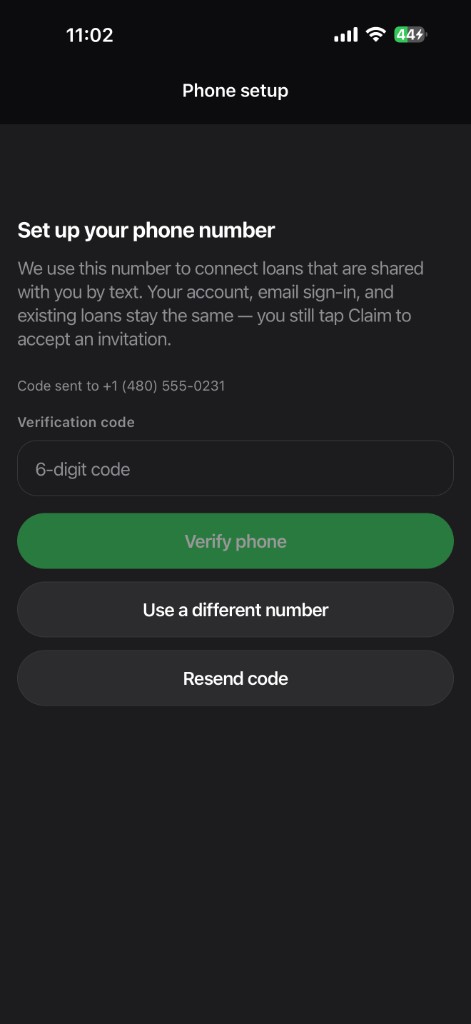
Step 4 — Verification code: shown only after the user
consented and tapped Send verification code.
Additional disclosures
SMS is used for account verification and
loan-related notifications and reminders.
Message frequency varies based on account activity and reminders.
Message and data rates may apply (carrier charges).
Users may reply STOP to opt out of SMS.
Users may reply HELP for help.
Consent is obtained before SMS messaging begins, on the Phone
setup screen.
Borrowly does not sell or share mobile numbers with third parties for
marketing or promotional purposes.
 Borrowly